Jobber Revenue Reports Without the Spreadsheet Work
Ask Claude a revenue question and get an answer computed from your live Jobber data: invoiced totals by month, revenue by client or job type, outstanding balances, average invoice size. No export, no pivot table, no Sunday night in a spreadsheet. Your private connector, built on MCP, reads the numbers where they already live.
Updated July 2026
The question was never hard. The export was.
“How much did we invoice last month, and who still owes us?” is a fifth-grade math question sitting behind a twenty-minute ritual: export the CSV, fix the columns, filter the statuses, build the pivot, wonder if you filtered the statuses right. So the question gets asked quarterly instead of weekly, and the business runs on vibes in between.
The export ritual
- Export invoices to CSV
- Open the sheet, fix the date column. Again.
- Filter out drafts and bad debt, probably correctly
- Pivot by month, eyeball for duplicates
- Get interrupted, lose the thread, ship it Sunday
Just asking
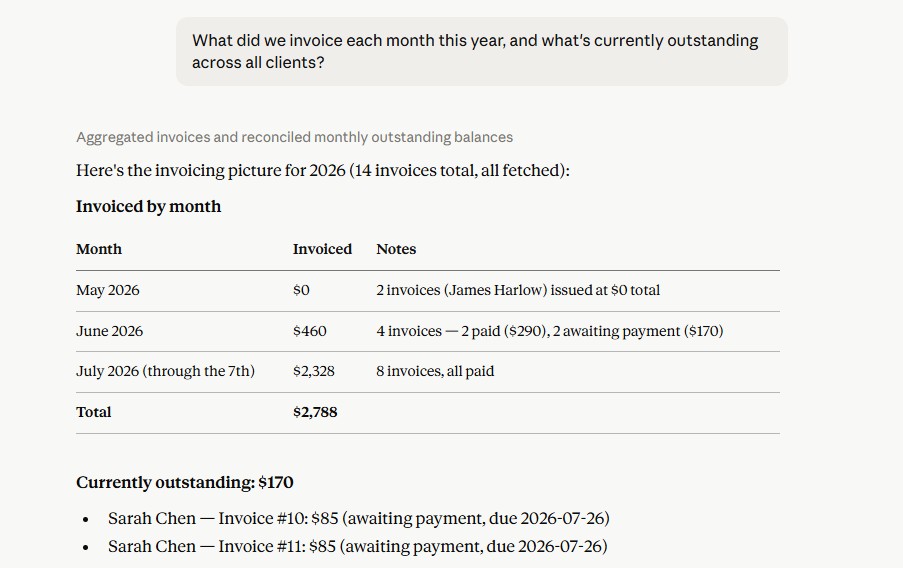
“What did we invoice each month this year, and what's currently outstanding across all clients?”
Monthly totals plus an aged list of unpaid balances, computed from live Jobber data in under a minute.
The questions worth asking weekly
A few that earn their spot in a Friday routine, each one a single message:
“Revenue by job type this quarter. Which service line is growing?”
Mowing vs installs vs cleanups, from invoice line items, not from memory.
“Top 10 clients by invoiced total over the last 12 months.”
Your real key accounts, which are rarely the loudest ones.
“What's our average invoice size this year versus last year?”
The quiet number behind whether pricing changes actually stuck.
“Show unpaid invoices over 30 days old with client contact info.”
Collections list, ready for calls, no aging report export.
“Compare this June to last June. Are we actually up?”
Seasonality-honest comparison in one line.
Revenue tells you half the story
Everything above is top-line: what you billed and what came in. Whether any given job made money is a different question, answered by costs against revenue per job, and it deserves its own page. The short version: the reports here tell you where the money came from; job costing tells you what it cost to earn.
When you do want the spreadsheet
Sometimes the answer belongs in a sheet: the bookkeeper wants it, the bank wants it, you want a running record. Claude can push Jobber data straight into a connected Google Sheet, no manual export, so the spreadsheet becomes a destination you choose instead of a toll you pay.
Ask your first question in 5 minutes
Connect once with your own Jobber developer credentials: How to Connect Jobber to Claude. $47/month after a 7-day free trial. The first Friday you skip the export ritual, you'll wonder why reporting was ever a chore.
Frequently asked questions
How current is the data Claude reports on?
Live. Claude queries your Jobber account at the moment you ask, so the answer reflects every invoice and payment as of right now, not as of your last export.
Can it break revenue down by service line or crew?
By anything Jobber knows: job type, line items, client, property, date range, or the team members on the work. If the dimension exists in your Jobber data, you can slice by it.
Will the numbers match Jobber's built-in reports?
They come from the same records, so yes, provided you're comparing the same definitions. Ask Claude to state what it included (paid vs issued, drafts excluded, date basis) and you can match any Jobber report line for line.
Is this a replacement for my accounting software?
No. This is operational reporting from Jobber's records: invoiced, collected, outstanding. Your books, taxes, and P&L still live with your accountant and accounting software.
Can I get the same report every week without re-typing the prompt?
Save the prompt anywhere handy and paste it each Friday, or start a dedicated "Weekly numbers" conversation and just say "run it again."
Keep going: more ways to run Jobber by chat
Job Costing: What Actually Made Money
Revenue, labor, materials, and margin for any job or the whole season.
Read guideManage Invoices by Chat
Send, chase, record payments, and close, draft through bad debt.
Read guideFind Uninvoiced Work
Audit your whole account for finished work that never got billed.
Read guide